8.3 Sets and maps
Many programming tasks involve finding the right piece of information in a large dataset. That is, we have a collection of items, and we want to quickly retrieve the items matching certain criteria. Here are some examples of information retrieval problems:
- Spell-checking
- Given a set containing valid English words, check if a given string is a valid word.
- Cash register
- Given a database of everything for sale in a supermarket, find information about the item with a given EAN code.
- Search engine
- Given a collection of documents, find all documents containing a given word.
These problems can all be addressed using two abstract data types: the set and the map. Both provide efficient ways to manage a collection of elements, supporting operations to find, add, and remove elements.
Sets and maps are useful in a huge variety of computer programs, and are perhaps the most useful of all data structures. But how can we design a class that implements a set or a map, in such a way that adding, removing and searching can be done efficiently? Later we will see several different ways of implementing sets and maps.
Just as for priority queues we can implement a set or a map using a linked list or a dynamic array.
In Chapter 10, we learn about self-balancing search trees, a data structure for sets and maps where adding, removing and searching are all efficient.
In Chapter 11, we learn about hash tables, which can be even faster than search trees, under some circumstances.-
Search trees and hash tables are the main ways that sets and maps are implemented in practice. Almost every programming language provides sets and maps as a built-in feature, based on one of these technologies.
8.3.1 Sets
A set represents a collection of items, where we can add and remove items, and check if a given item is present in the set. A set cannot contain duplicate items: if we try to add an item that is already present, nothing happens, and the set is left unchanged. We can specify a minimal interface for sets like this:
interface Set of K extends Collection:
    add(set, key: K)               // Adds the key to the set.
    remove(set, key: K)            // Removes the key from the set, if it is there.
    contains(set, key: K) -> Bool  // Returns true if the key is in the set.
Example: Spell-checking
We can use a set to create a very simple spell-checker, like the first example at the beginning of this section.
To create the spell-checking lexicon, we start with an initially empty set, and then repeatedly add each valid word to the set. Then to spell-check a given word, we just call contains on the set.
We could also extend the interface with “bulk” operations, for taking the union or intersection of two sets. There are some data structures that can handle operations like that efficiently, such as the disjoint-set data structure (see Section 9.3). But it is very difficult to design data structures that can handle bulk operations, so we do introduce any interface for them in this introductory text.
8.3.2 Maps, or dictionaries
A map (or dictionary) represents a set of keys, where each key has an associated value. We can add and remove keys, but when we add a key we must specify what value we want to associated with it. We can check if a given key is present in the map, and we can also look up a key to find the associated value.
A map cannot contain duplicate keys, so each key is
associated with exactly one value. If we call put(k,v), but
the key k is already present, then the value associated
with k gets changed to v. On the other hand, a
map can contain duplicate values: two keys can map to
the same value. Here is a possible minimal interface for maps:
interface Map of K to V extends Collection of K:
    put(map, key: K, value: V)     // Sets the value of the given key.
    get(map, key: K) -> V          // Returns the value associated with the given key.
    remove(map, key: K)            // Removes the value associated with the given key.
    contains(map, key: K) -> Bool  // Returns true if the key has an associated value.
Note that maps depend on two different types, the keys K
and the values V. These types can be the same or different,
depending on the needs of your application.
Example: Cash register
A map is a perfect match for implementing the cash register example from the beginning of this section: to find information about an item with a given EAN code.
Here, the key should be the EAN code that the barcode scanner recognises, and the value should be a record containing information about the item. For example, the information record could be structured like this:
datatype Item:
    ean: String
    name: String
    price: Number
    expires: Date
Now, to put an item p in the database we simply call
put(database, p.ean, p), and to find the item with barcode
code we call get(database, code).
8.3.3 Multimaps
Maps have the restriction that each key has only one value. However, sometimes we want to store a list of records, where some records might have the same key. Then we want something like a map, but where a key can have multiple values associated with it. This structure is called a multimap.
Most programming languages do not provide a multimap data structure, but this is not a serious drawback because we can easily implement it ourselves. The idea is to use a map, whose value type is a set of the actual values that we are interested in:
datatype Multimap of K to V:
    mmap: Map of K to (Set of V)
To add a value to a multimap mm, we specify a key and
value just as with a regular map:
put(mm, key, value):
    set = get(mm.mmap, key)       // Fetch the set associated with key
    if set is null:               // There is no set associated with key
        set = new Set()           // Needs to use a specific set implementation
        put(mm.mmap, key, set)    // Associate key with the currently empty set
    add(set, value)               // Add value to the set associated with key
Other possible operations can be used to remove a value (with an associated key), and to iterate over all values for a given key.
Note that we do not have to put the updated set back
into the internal map. Complex data structures are mutable:
when we update a set using add it is modified
in-place – so it is still pointed to by the internal map.
Example: Search engine
The search engine example is a good use case of a multimap.
First we have to build the database, which is a multimap where the key
is a word, and the values are all document id numbers containing that
word. Now, searching for a word just means looking it up in the
multimap, which is the same as calling get on the
underlying map.
8.3.4 Implementing sets and maps using linked lists
A simple (but inefficient) data structure to implement a set is a linked list. Recall from Section 6.2.1 that a linked list consists of nodes pointing to their successors:
To search for an element we just iterate through all nodes and compare with the value we are looking for. To add an element we can simply insert it at the head of the list. But before we do that we have to search for it to check that it is not already in the list, because a set does not allow duplicate elements.
To remove an element we search for it to get its node, and then we repoint the preceding node to the node following it, like this to remove element B:
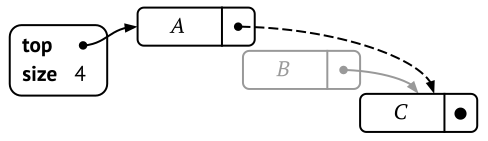
Conceptually this is not difficult, but the code becomes a little complicated because we have to keep track of the preceding node:
remove(set, key):
    previous = null
    node = set.head
    while node is not null and key != node.key:
        previous = node
        node = node.next
    if previous is null:
        set.head = node.next
    else:
        previous.next = node.next
Note that we have a special case: if the preceding node is null it is the head of the list that should be removed.
The linked list can easily be modified to implement a map instead of a set. We just augment the linked list nodes to also include the value:
datatype MapNode:
    next = null  // Pointer to the next node in the list
    key          // Key for this node
    value        // Value for this node
Just as for priority queues, we can also use dynamic arrays to implement sets and maps, and we will discuss that in the next section.